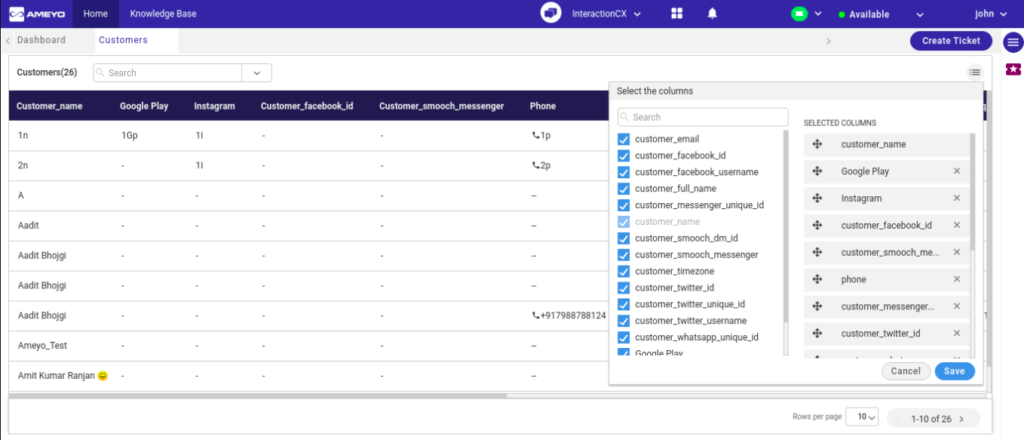
Enhanced Customer Search
Agents often need to search for customers based on secondary attributes like credit card or account type, home network, etc. In case of such a customer search, they need to view both the customer's unique identifier, name, and the searchable attribute to make sure they select the right customer, as right customer identification is a core tenet of providing a good customer experience.
Ameyo now provides you with more powerful customer search capabilities, enabling agents to search for a customer based on any attribute that the Administrator has marked as searchable. Additionally, agents can also select which of the customer attributes they want to see in the search results, further empowering them to search for the right customer in the least amount of time.
Internal Chat Broadcast Enhancements
One of the negative effects of WFH necessitated by the COVID-19 pandemic has been difficulty in coordinating the entire team, for the manager. This is felt acutely in contact centers, as Supervisors are unable to effectively relay instructions to Agents, like switching to secondary call context or other important instructions.
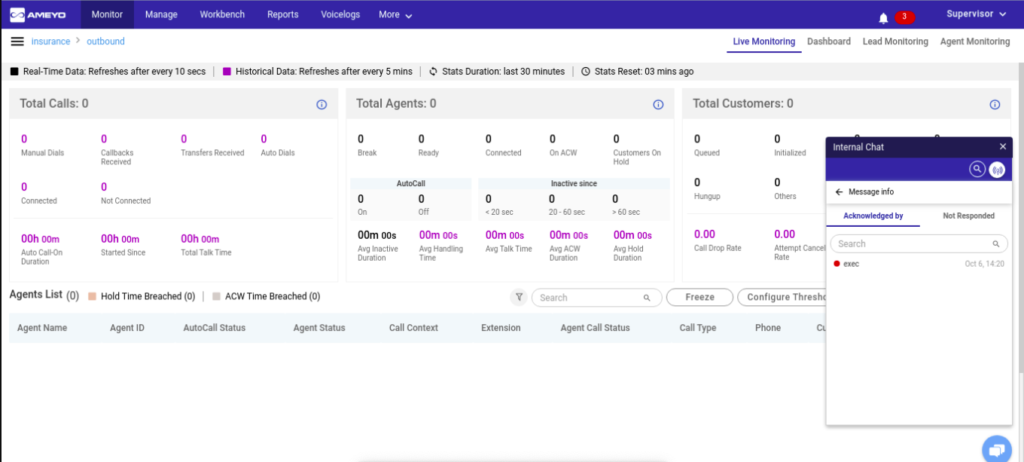
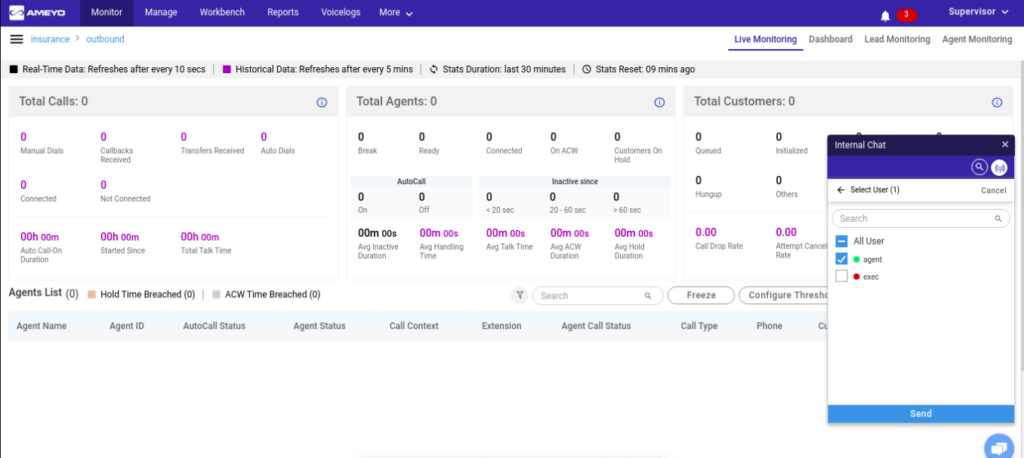
Ameyo Supervisors can now use the internal chat feature to-
- Broadcast messages to selected or all agents
- Require an acknowledgment of the broadcasted message by the Agents, and
- View which agents have acknowledged or not yet responded to messages.
Tab Masking for Supervisors
Different businesses structure their contact centers with different hierarchies or user roles. While some businesses may require Supervisors to both monitor and manage the contact center, others may have specific employees for monitoring of agents and management of the operations.
Thus, Ameyo now empowers the Administrator to enable access for each tab (monitor, manage, reports, voice logs) for either individual Supervisors or the entire system.
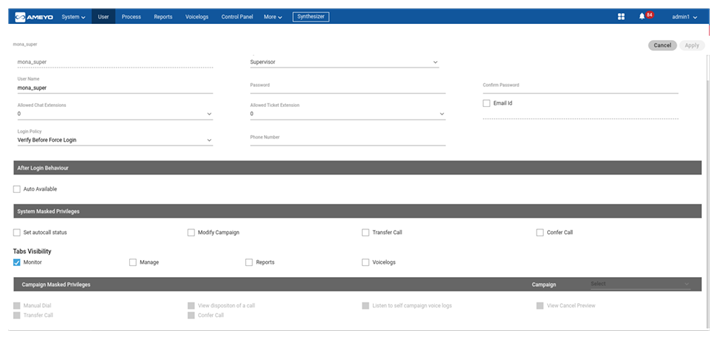
Tab Masking for Supervisors
Different businesses structure their contact centers with different hierarchies or user roles. While some businesses may require Supervisors to both monitor and manage the contact center, others may have specific employees for monitoring of agents and management of the operations.
Thus, Ameyo now empowers the Administrator to enable access for each tab (monitor, manage, reports, voice logs) for either individual Supervisors or the entire system.
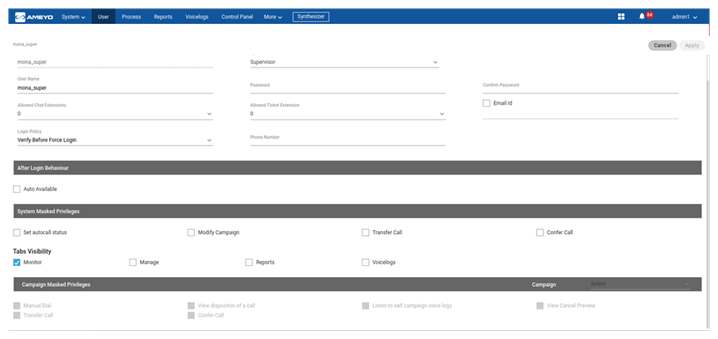
Masked Privileges (Change Password)
Agents can sometimes unwittingly change their passwords and then forget them, resulting in a loss in productivity and cost of resource utilization, as their passwords must now be reset before the agent can start working again.
In order to ensure such losses do not occur, the ability to change passwords will now be a masked privilege, in other words, unless automatic password policy change is required or the supervisor explicitly enables the agent, the agent will not be able to change their password.
Explore More Ameyo Platform CC →Google’s Business Messages as a Customer Engagement Channel
Google’s Business Messages is a mobile conversational channel that brings all the chats from different entry points of Google Maps, Search, and brand websites to create rich, asynchronous messaging experiences that delight customers and drive business results.
With the new enhancement, Ameyo now supports GBM as a chat channel. As a result, businesses can now integrate GBM with Ameyo to engage with their customers with an improved conversion rate.
By adding GBM via the AMF (Ameyo Messaging Framework), all features of a regular social messaging chat are automatically enabled on GBM as well.
The feature set for GBM with Ameyo will include the following:
- The agent can create tickets for the incoming chats, and agents can reply on them from their interface.
- The customer and the agent can share various media files – such as images, pdf files, videos, GIFs, carousels, images, rich cards, and more.
- Auto Ticket Creation Capabilities: A new ticket is created when a customer initiates a conversation through Google’s Business Messages. A bot or agent can further handle this ticket and if the query is resolved instantly, it will be closed as a Lite Ticket. If the customer query remains unresolved, the automatically generated ticket will be routed to the right department or agent according to the predefined routing algorithm.
- Monitoring and Tracking Capabilities: The supervisors and managers can track and monitor all the chats coming in through Google’s Business Messages. The supervisor dashboard will populate all the key metrics, and various reports will be generated to monitor and analyze these chats.
Video as a Customer Engagement Channel
Providing a personalized experience for your customers has never been more important, and more difficult than it is today in this COVID-19 pandemic.
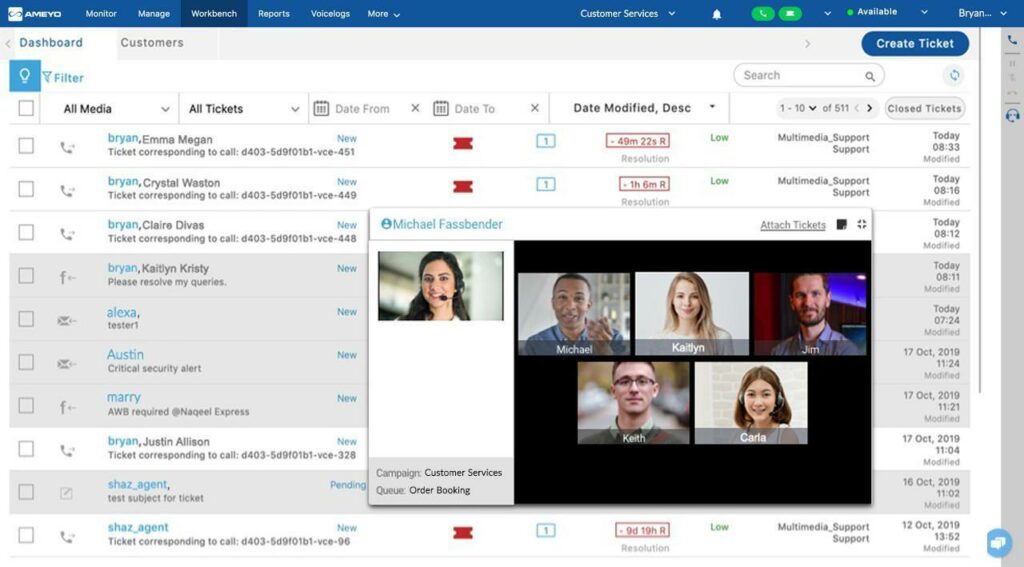
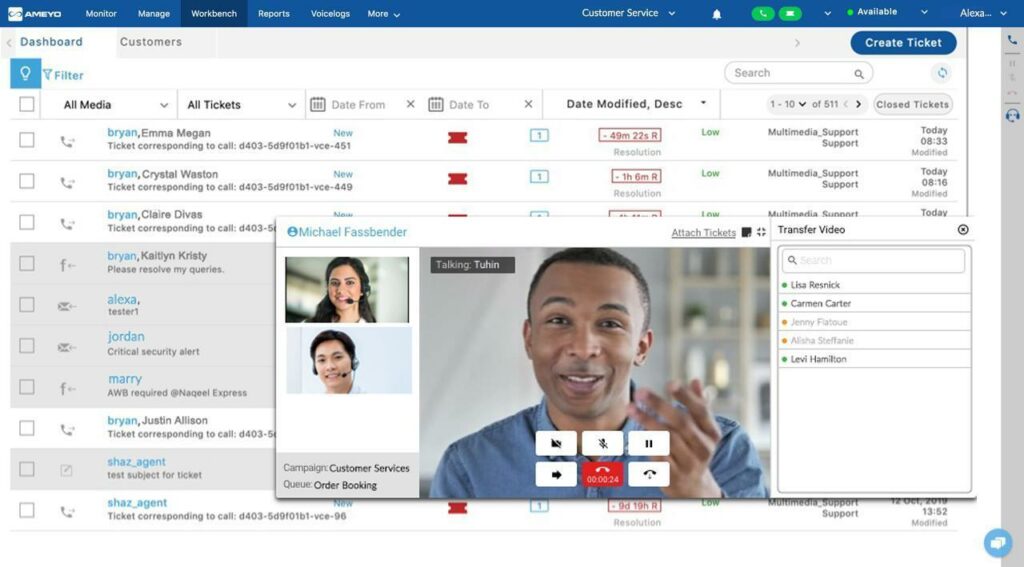
Ameyo has introduced Video Chat as a Customer Engagement Solution with this GA version. With this new enhancement, Ameyo agents can connect with the customers via video chat and add external parties/people into call conferences in the ongoing video chat by sharing an SMS link. The following features will be there in Video Chat to provide a seamless experience to customers:
- Ameyo Agents can transfer the call to another user who has Auto Video Chat enabled in the same campaign.
- Ameyo Agents will be able to see the history of the video chats attended by them. Supervisors can view the video chat history of the assigned campaign.
- The Supervisor will have access to the following reports:
- ACD Video Chat Details Report: This report will give details of the incoming video chats that have been taken care of in the selected campaigns.
- Video Chat History Report: It will provide details on the holistic data for video chats handled in the system with parameters like Video Chat Time, Campaign Name, Lead Name, Customer Talk Time, etc.
- Agent Productivity Report for Video: This report will give comprehensive data on the agent’s overall performance and efficiency in a particular selected time frame.
- Abandon ACD Video Details Report: This report provides detailed information on all inbound or transferred to campaign video chats that have been abandoned at the ACD (queue).
- Ameyo Supervisor will have access to Live Monitoring with real-time stats refreshed after every 10 seconds.
This enhancement will enable supervisors to have access to AQ monitoring and scoring and analyze the agent’s interaction with the customer and rate his performance based on various Administrator-configured parameters.
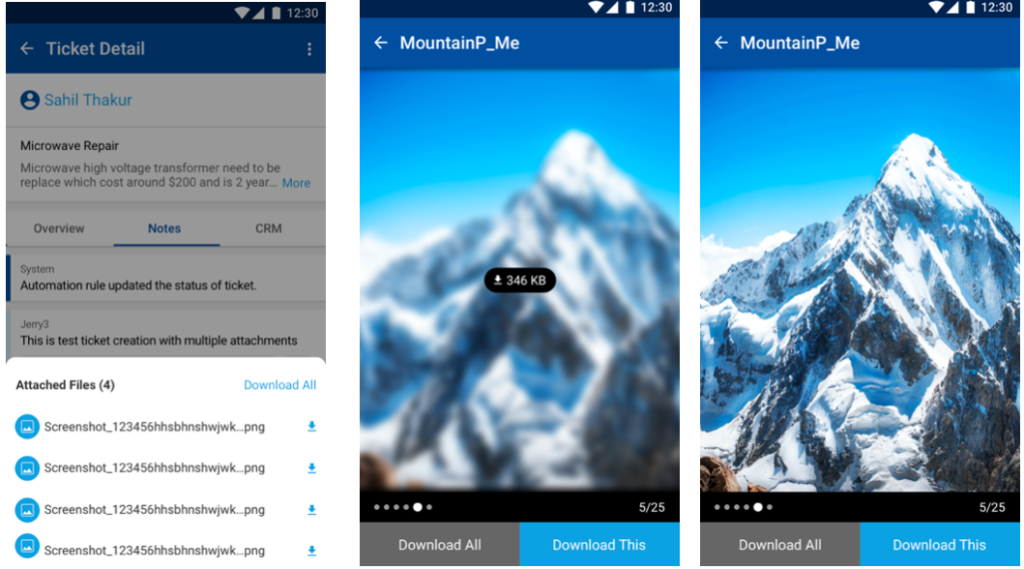
Preview attachments in Field Agent App
The Ameyo Field Agent mobile application enables last-mile service/ collection use-cases for the business. This application is installed on the field agent's mobile phone, which often, is a very basic entry-level smartphone, with limited memory.
In such scenarios, it can be very inconvenient to first download any attachments in the ticket and then remember to delete them once viewed, due to the limited storage capacity of the phone, as the field agents may lack the technical skills necessary. It can even be a compliance risk as the attachment may contain sensitive information.
To overcome this potential inconvenience, Ameyo now enables agents using the Field Agent app to preview any or all attachments in the ticket, without the need to download them.
FB Messenger l Showing Chats from different pages of a single account
There are businesses that have multiple brands under one Umbrella brand and are managing other brands under a single account. These businesses create multiple pages under a single account. The agents do not get to know the page name from which the chat was initiated. Thus, Ameyo is providing an option that has good experience as well as cost-effectiveness. When the agent receives a chat message, a system-generated message is displayed in the chatbox that tells the page from which the chat has been initiated.
Once the chat is disposed of by the agent, the Source Page field, on the ticket info screen, specifies the name of the page from which the chat was initiated. The Source Page can be clicked on and the user will be directed to that FB page.
The same data is also available in the chat history table.
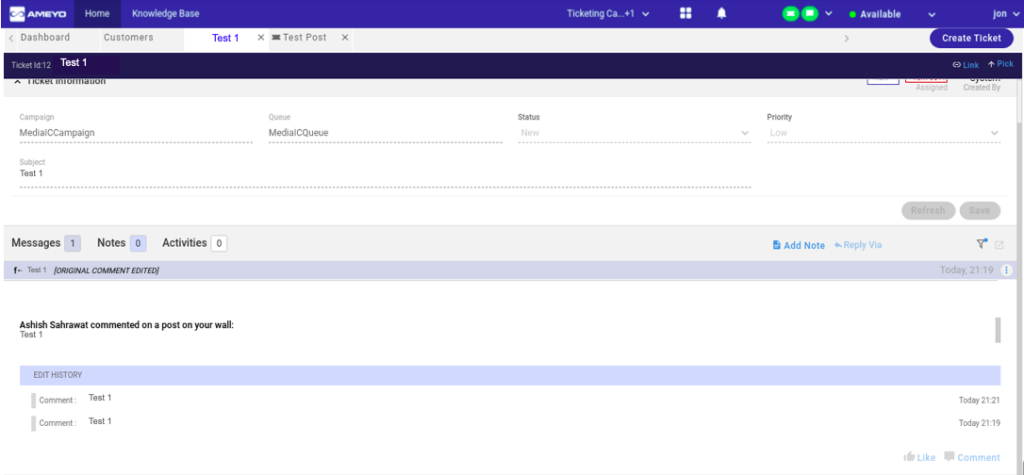
Explore More Fusion CX →Showing actual time of a Facebook post and comment in ticket messages
Businesses need to revert to customers’ messages within a certain period of time. For agents, knowing the actual time when the ticket was created by the customer allows them to acknowledge accordingly.
In the case of a FB post, both the actual time - when the post was created by the customer on FB, and the time when it was created on Ameyo’s app server are displayed on the agent’s screen.
The time displayed against the post is the time when the post was created on Ameyo’s app server. When the agent hovers over this time, the time when the post/comment was created by the customer on FB is displayed as a tooltip. This will help agents to send responses to customer queries in an appropriate manner.